
 Give Feedback
Teaching the Kano Model: University Mode
The Kano model is a cornerstone framework taught in business schools, product management courses, UX research degrees, and engineering programs worldwide.
University mode gives educators and students a seamless way to put theory into practice. Professors can organise classes and monitor student coursework, while students get hands-on experience running real Kano surveys and analysing customer satisfaction data — with zero spreadsheet configuration required.
How University mode works
University mode connects students with their instructor's dashboard while keeping student accounts independent and secure. It is split into two simple parts:
For Professors & Instructors
1. Create a class
Once you are signed in to your account, head to Professor Mode (also accessible from your Settings page). Enter a name for your class — such as Product Design 201 or MBA Marketing Spring — and click Create Class.
2. Share your join code or link
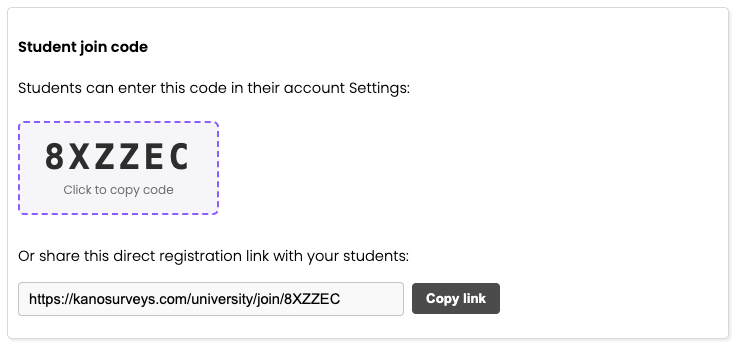
Every class receives a unique 6-character code and a direct join link. You can paste this link into your course syllabus, lecture slides, or learning management system (Canvas, Blackboard, Moodle, etc.).
3. Monitor student progress in real time
As students join your class, your class dashboard displays all enrolled students in one place:
Student details: Student name, email address, and enrollment date.
Survey activity: Survey titles, creation dates, and status (Active or Inactive).
Response counts: Real-time tally of completed responses for each student survey.
Live survey links: Direct links to view students' public survey response pages.
Professors have read-only visibility into student survey progress. You can easily verify participation and inspect survey design, without ever having edit access to modify a student's work.
For Students
1. Join your class
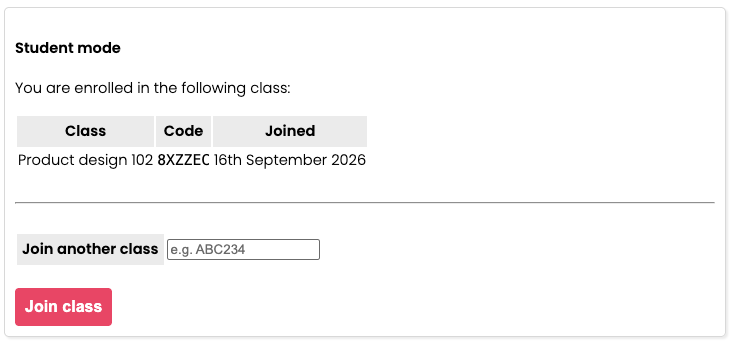
Joining a class is quick and straightforward:
Direct link: Click the share link provided by your professor (
https://www.kanosurveys.com/university/join/CODE). If you don't have an account yet, you will be prompted to create one, and you will automatically join the class upon registration.Class code: If you already have an account, go to your Settings page, enter the 6-character code under Join a Class, and click Join.
2. Build and publish your Kano surveys
Once enrolled, you use KanoSurveys just like any other researcher — define your feature ideas, write functional and dysfunctional questions, publish your survey, and share your link with participants to gather data.
3. You own your account and surveys
Joining a class connects your survey metadata with your professor's dashboard so they can check your coursework, but your account and surveys remain 100% yours. Professors cannot edit your surveys or alter your responses.
Available on Free and Pro plans
University mode is completely free for both professors and students on our Standard plan. You can create classes, invite unlimited students, and collect survey responses at no cost.
If you or your students need advanced analysis techniques, custom exports, or higher response limits, Pro accounts work seamlessly with University mode as well.