Give Feedback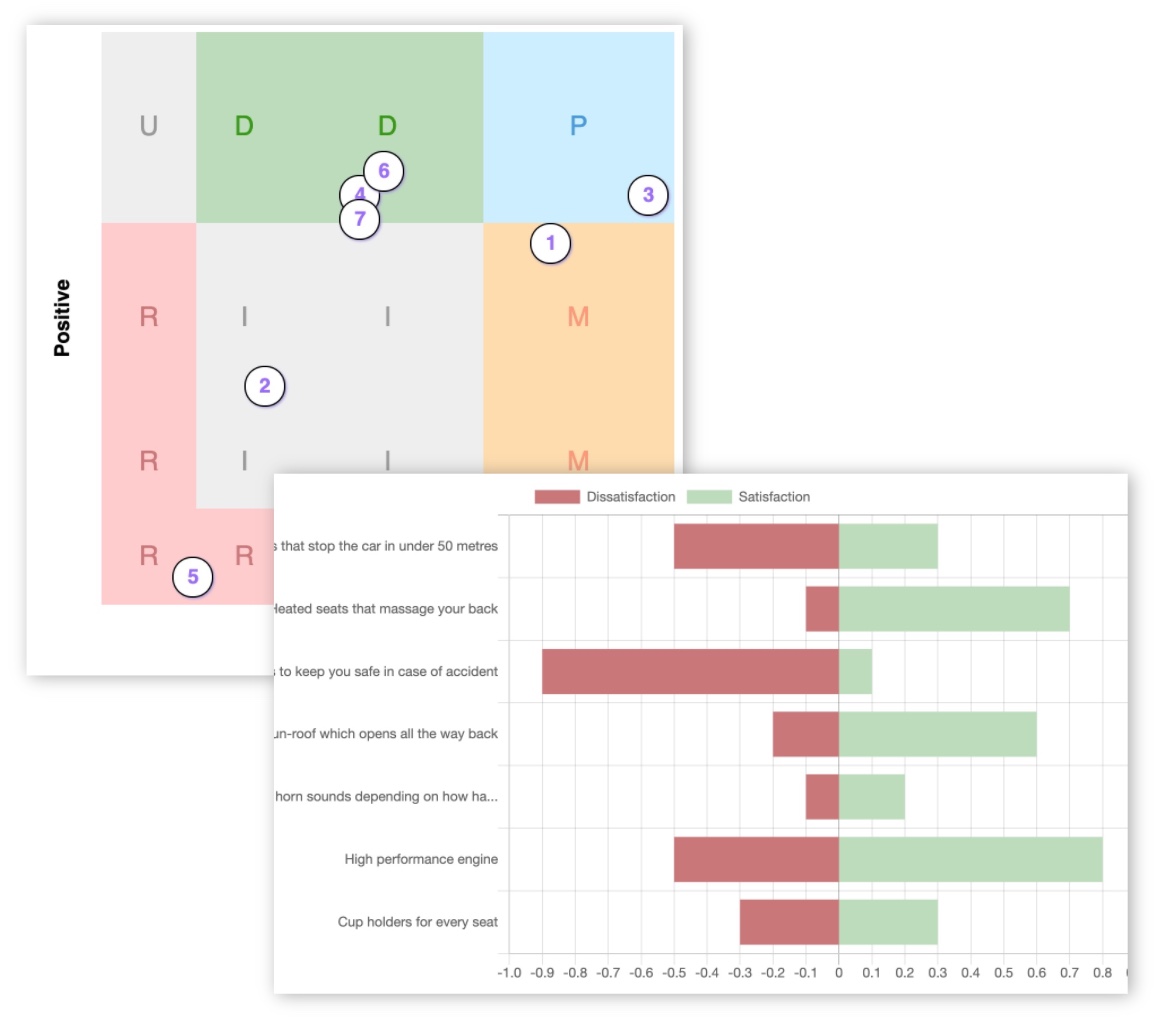
KanoSurveys vs spreadsheets: which is better for Kano Model surveys?

Both can analyse Kano data. The difference is how much you build yourself — and how much you risk getting wrong.
Kano Model surveys are structurally complex. Every feature needs a functional and a dysfunctional question. Every pair of answers must be mapped to a Kano category: Must-have, Performance, Attractive, Indifferent, Reverse, or Questionable. And the results need to go beyond simple counts into actionable prioritisation.
Many teams reach for a spreadsheet because it is familiar. But spreadsheets only handle the calculation layer. They do not build the survey, deliver it, or turn the output into roadmap decisions. KanoSurveys is built to handle that entire journey.
Short answer: choose KanoSurveys if you want to run a Kano survey properly without building the whole system yourself. Choose spreadsheets if you want a free, fully manual workflow and have the time and skill to validate everything yourself.
Quick comparison
| Factor | KanoSurveys | Spreadsheets |
|---|---|---|
| Survey delivery | ✓ Built in | × Needs a separate tool |
| Kano question format | ✓ Automatic | × Manual setup for every feature |
| Kano categorisation | ✓ Automatic | × Manual formulas and lookup tables |
| Advanced analysis | ✓ Built in | × Must be built from scratch |
| Feature prioritisation | ✓ Built in | × Must be built from scratch |
| Segmentation | ✓ Custom fields | ✓ Pivot tables and filters |
| Error risk | Low | High (formula and copy-paste errors) |
| Entry cost | Free tier, then £7/month | Low direct cost |
| Time to first insight | Fast | Slow |
| Flexibility | Kano-focused | Fully custom |
What each tool actually does
- ✓ Add features to test
- ✓ Publish and share a survey link
- ✓ Collect responses
- ✓ View automatic Kano analysis
- ✓ Segment results
- ✓ Use prioritisation to decide what to build
- ✓ Write paired functional and dysfunctional questions
- ✓ Build a form in a separate survey tool
- ✓ Export responses to CSV
- ✓ Clean the data
- ✓ Write categorisation formulas
- ✓ Build charts
- ✓ Manually prioritise features
Spreadsheets are not really a Kano survey tool. They are an analysis layer built on top of several other manual steps.
And the analysis features aren't really built-in, you have to code them yourself → how to do Kano model analysis.
Feature comparison
| Feature | KanoSurveys | Spreadsheets |
|---|---|---|
| Kano-specific survey creation | ✓ | × |
| Hosted survey delivery | ✓ | × |
| Real-time analysis | ✓ | × |
| Standard Kano categorisation | ✓ | Manual |
| Advanced Kano analysis | ✓ | Build it yourself |
| Feature prioritisation | ✓ | Build it yourself |
| Custom segmentation | ✓ | ✓ (pivot tables) |
| Feature randomisation | ✓ | × |
| Step-by-step survey mode | ✓ | × |
| Custom branding | ✓ | × |
| CSV export | ✓ | ✓ |
| Custom formulas and logic | × | ✓ |
| Raw data access | ✓ | ✓ |
| Combine with other data sources | × | ✓ |
Analysis and prioritisation
This is the most important practical difference. Spreadsheets can produce correct Kano results, but only if the formulas are built and validated carefully. Common mistakes include incorrect lookup tables, broken formula ranges, copy-paste errors across feature columns, and analysing stale exports.
KanoSurveys analysis
- Automatic categorisation from day one
- Advanced analysis beyond basic category counts
- Built-in prioritisation to support roadmap decisions
- Consistent results across every survey run
Spreadsheet analysis
- Correct only if carefully built and tested
- Formula errors are easy to miss
- Advanced analysis requires extra modelling work
- Prioritisation must be designed and maintained manually
Key risk: spreadsheets often stop at category counts. Without prioritisation, teams are left to make roadmap decisions subjectively — which can defeat the purpose of running a Kano survey.
Pricing
| Option | KanoSurveys | Spreadsheets |
|---|---|---|
| Free tier | 5 responses, basic categorisation | Google Sheets usually free |
| Paid tier | £7/month — unlimited responses, advanced analysis, prioritisation, export | Microsoft 365 / Workspace subscription may apply |
| Hidden cost | None | Time to build, validate, fix errors, and re-run every cycle |
| Survey tool cost | Included | Additional (Typeform, SurveyMonkey, Google Forms, etc.) |
Spreadsheets look free. But the real cost is the time spent building the survey structure, writing and testing formulas, cleaning data, creating charts, and fixing mistakes. For a team running more than one Kano survey, that time cost quickly exceeds the cost of a dedicated tool.
Pros and cons
KanoSurveys — pros
- Purpose-built for Kano surveys
- No manual survey setup
- Automatic analysis and prioritisation
- Faster to launch
- Fewer errors
- Cleaner output for stakeholders
- Better for repeatable research cycles
KanoSurveys — cons
- Less flexible than a fully custom model
- Not a general-purpose data analysis tool
- Paid plan required for advanced use
- Not suitable for unusual custom research designs
Spreadsheets — pros
- Fully flexible and customisable
- Low direct cost
- Good for learning the Kano method
- Full access to raw data
- Easy to combine with other datasets
- Extendable with macros, scripts, and BI tools
Spreadsheets — cons
- Not a survey tool — requires a separate form builder
- Manual paired-question setup
- High formula error risk
- Manual data cleaning and exports
- Prioritisation must be built from scratch
- Version-control problems across teams
- Harder to present to non-technical stakeholders
Verdict
| Category | Winner |
|---|---|
| Speed | KanoSurveys |
| Survey delivery | KanoSurveys |
| Automatic analysis | KanoSurveys |
| Feature prioritisation | KanoSurveys |
| Avoiding errors | KanoSurveys |
| Stakeholder communication | KanoSurveys |
| Raw flexibility | Spreadsheets |
| Learning the Kano method | Spreadsheets |
| Custom data modelling | Spreadsheets |
| Low direct cost | Spreadsheets |
- ✓ You want to run a Kano survey, not build a system
- ✓ You care about speed and analysis quality
- ✓ You want prioritisation, not just category labels
- ✓ You expect to run more than one Kano survey
- ✓ You are making real roadmap decisions
- ✓ You are learning the Kano Model
- ✓ Your sample is very small
- ✓ You need full control of every formula
- ✓ You need to combine Kano with other internal data
- ✓ You have analytical skills and time to validate the model